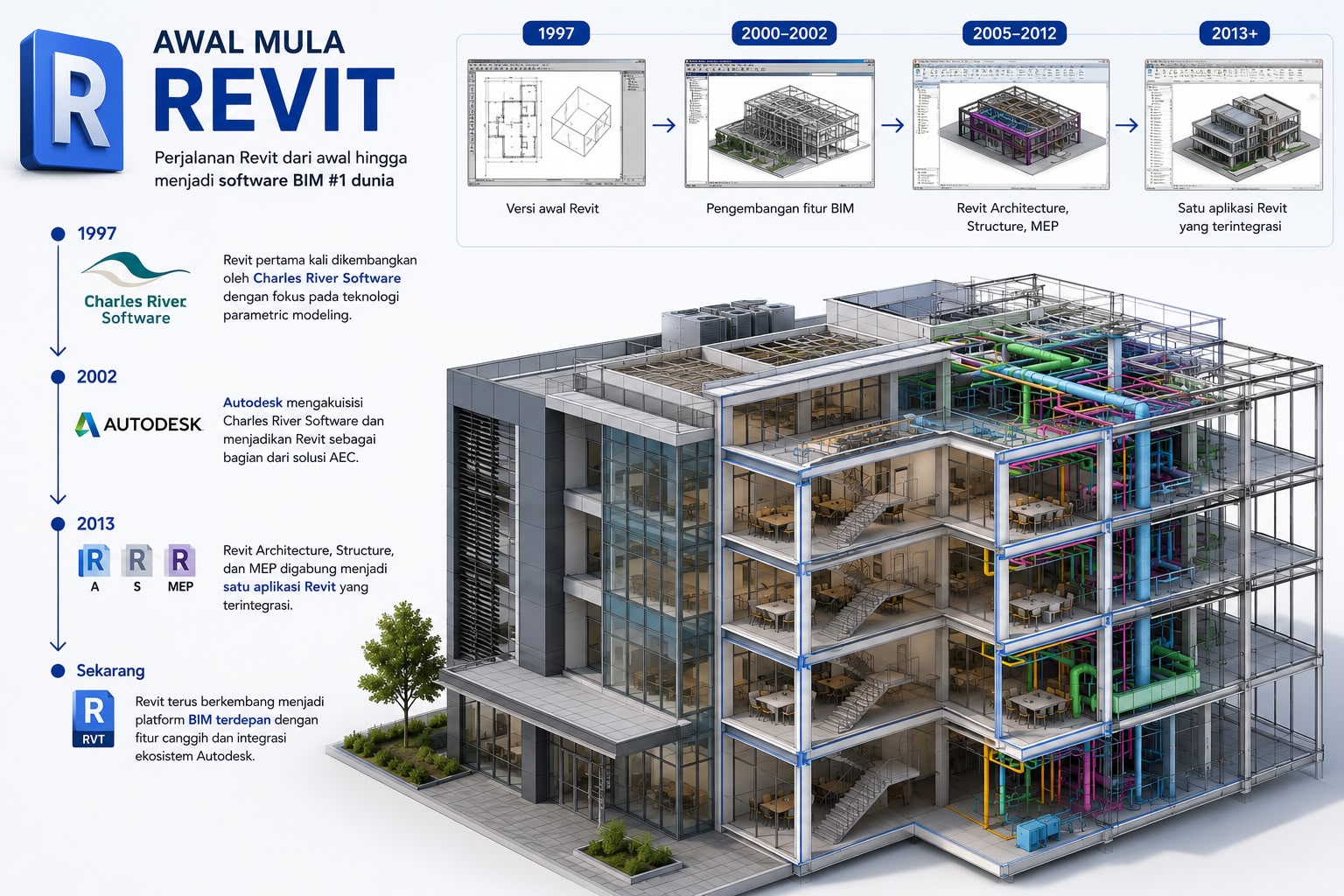
Revit is Building Information Modeling (BIM) software developed by Autodesk and the global industry standard for architecture, structure, and MEP engineering. In Indonesia, Revit is the most dominant BIM platform and is used by nearly all major state-owned contractors and leading consultancies. This article explains what Revit is, its brief history, its key features per discipline, a typical project workflow, its role alongside SketchUp, and how to build Revit capability in your team.
What Is Revit and Its History
Revit was developed by Charles River Software in 1997 and acquired by Autodesk in 2002. Since then it has become Autodesk's flagship BIM product, covering architecture, structure, and MEP in one integrated application. Revit is not just a 3D modeler—it is a BIM authoring tool that stores parametric information per element (walls, columns, pipes, cables), so changing one element automatically coordinates with the others. That is what sets Revit apart from geometry-only tools like SketchUp.
Why Revit Became the Industry Standard
Three reasons Revit dominates: (1) the most complete ecosystem—native integration with Autodesk Construction Cloud (ACC), Autodesk Navisworks for clash detection, Autodesk Civil 3D for infrastructure, and a wide range of supporting plugins; (2) standard file formats—the Revit file (.rvt) and the IFC exchange format are supported by most other BIM software; (3) the largest talent pool—there are far more Revit-certified BIM modelers in Indonesia than for any other tool. The implication for decision-makers: choose Revit if you want easy access to talent, integration with the Autodesk ecosystem, and abundant training resources.
Key Revit Features per Discipline
Architecture: a complete family library (parametric walls, doors, windows, roofs), sheet management, automatic scheduling, and rendering via plugins. Structure: modeling of steel, concrete, and timber structures with basic analysis and export to Autodesk Robot Structural Analysis for detailed analysis. MEP: modeling of mechanical (HVAC), electrical, and plumbing systems with load calculation and coordination against the structure. Plus cross-discipline features: view and sheet templates, a family editor for custom parametric content, and worksharing for multi-user collaboration. Recent versions also add automation aids such as clash detection and faster documentation.
A Typical Revit Project Workflow
A typical Revit workflow: (1) project setup—an organization-specific Revit template (BIMAGE provides ISO 19650-compliant templates), levels, and grids; (2) modeling—architects start at LOD 200 then detail to LOD 300–400; (3) multi-discipline coordination—structural and MEP engineers link the architect's file as a reference and model in parallel; (4) regular clash detection via Autodesk Navisworks; (5) documentation—automatic sheets and schedules from the model for material take-off; (6) coordination with contractors through 4D simulation; (7) handover—export to IFC and ACC for facility management.
Revit and SketchUp: Different Roles
Revit excels in complete BIM capability, Autodesk ecosystem integration, and a large talent pool—ideal for medium-to-large projects that require BIM compliance. SketchUp excels in fast conceptual modeling at lower cost, but SketchUp is not a BIM authoring tool—it is geometry only, without parametric data. SketchUp is therefore right for early concept work and client presentations, while Revit is used for compliant BIM production. For Indonesian projects that require BIM (Permen PUPR 22/2018), Revit is the primary choice, with SketchUp as a visualization companion.
Revit Licensing in Indonesia
Revit is available through Autodesk's subscription model. For a complete ecosystem (Revit + Civil 3D + Navisworks + supporting tools), the Autodesk AEC Collection is usually the best-value package. For teams with many users, procuring through an Authorized Partner such as BIMAGE provides pricing and support that better fit the team's needs. Education licenses are free for students and educators, and trial licenses are available for evaluation. For current pricing matched to your team's configuration, contact BIMAGE as an Autodesk Gold Partner.
Building Revit Capability in Your Team
A learning roadmap for new team members: (1) Fundamentals—navigation, basic modeling (walls, floors, roofs), the family browser; (2) architectural detail—stairs, railings, openings, and the basic family editor; (3) documentation—sheets, schedules, annotations, and collaboration via worksharing; (4) advanced—the advanced family editor, scripting, and MEP or structural specialization; (5) certification—Autodesk Certified User or Autodesk Certified Professional. For team-based learning, BIMAGE provides corporate Revit training and implementation mentoring with a curriculum tailored to your industry (contractors, developers, consultants).
Get an Initial Consultation with BIMAGE Indonesia
BIMAGE Indonesia is an Autodesk Gold Partner and ACC Elite that runs Revit and the Autodesk ecosystem across 400+ global projects. We provide BIM consulting, corporate Revit training and implementation mentoring, Autodesk license procurement, and ACC implementation as a Common Data Environment. Contact our team for an initial consultation to assess your organization's Revit needs and recommend the right package.
Related Articles
Explore related topics in the BIMAGE BIM guide:
- Complete Autodesk Revit guide
- The Autodesk BIM software ecosystem
- Complete guide to Building Information Modeling (BIM)
- BIM dimensions 2D–7D explained
Frequently Asked Questions (FAQ)
What is Revit?
Revit is Autodesk's Building Information Modeling (BIM) authoring tool and the global industry standard for architecture, structure, and MEP. Unlike traditional CAD, Revit stores parametric information per element.
Is Revit free?
Revit is paid software on a subscription model. Education licenses are free for students and educators, and trial licenses are available for commercial evaluation.
What is the difference between Revit and SketchUp?
Revit is a BIM authoring tool with full parametric data, suited to compliant BIM production. SketchUp is a fast geometry-modeling tool for concepts and presentations, but it is not a BIM authoring tool.
How long does it take to learn Revit?
Basic proficiency (modeling simple projects) generally takes a few months of regular practice. Professional level requires experience across several real projects, with Autodesk certification taken after enough hands-on time.
Does Revit support BIM 5D, 6D, and 7D?
Yes. Revit supports BIM 5D (cost), 6D (sustainability), and 7D (facility management) through integration with the Autodesk ecosystem such as ACC and related analysis tools.